| |
SPECIAL CODE |
|
|
A special
code is used to open the door and hold it open. Use same special code to
close the door
10 Special Codes capacity |
|
| |
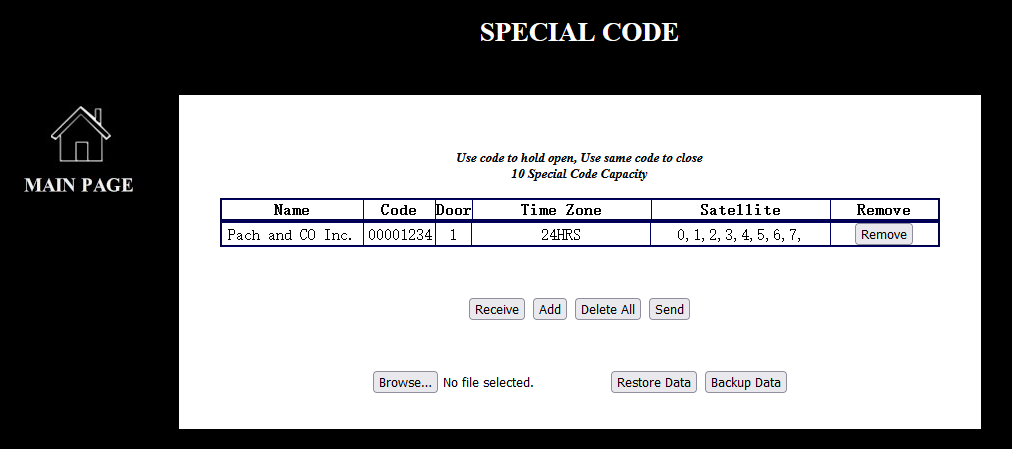
Figure 1
|
|
| |
|
|
| |
 |
|
| |
|
|
| |

Receiving the special codes from Telephone Entry System, only if the
special codes are lost. |
|
| |
|
|
|
 |
|
| |
Adding a
special code, see Figure 2 |
|
| |
|
|
| |
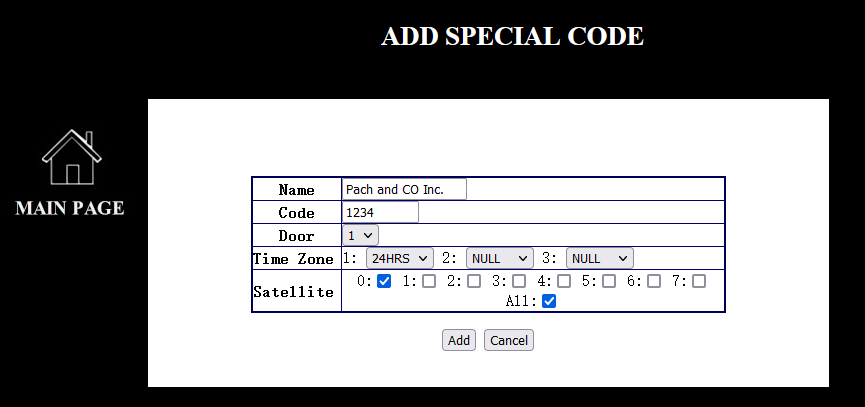
Figure 2 |
|
| |
|
|
| |
|
|
| |
[Name] up to 16
characters for example, Pach and CO Inc.
|
|
| |
[Code] 4, 5, 6, 7 or 8 digit,
depending on the setting under length of access codes
on
General Setting (for example 4 digit
access code 1234). 4-digit access code is a default setting. |
|
| |
|
|
| |
[Door] 1= Door 1
(Relay 1), 2= Door 2 (Relay 2), 3= Both Door 1 and Door 2 |
|
| |
|
|
| |
[Time Zone]
three different time zones can be assigned to each special code. See
Time Zone setting. 24HRS means the special
code will work 24/7. |
|
| |
|
|
| |
[Satellite] up to 8
satellites can be connected to each of the Telephone Entry System. At least
one satellite must be checked, even though no satellite is connected to
the Telephone Entry System. |
|
| |
|
|
| |
Adding a special code , see Figure 1
|
|
| |

Cancelling a new special code
|
|
| |

Removing a special code
|
|
| |

Deleting all special codes from the QWCM Web Based and Telephone Entry
System. Back up the special codes before deleting all.
|
|
| |
|
|
| |
|
|
| |
 |
|
| |
Sending all
special codes to Telephone Entry System |
|
| |
|
|
| |
 |
|
| |
Backing up
the special codes. Save backup file into a folder. Do not rename the database file name. The
special codes file name must be Scode_Config |
|
| |
|
|
| |
 |
|
| |
Restoring
the special codes from a backup file. Click
 and select
Scode_Config and and select
Scode_Config and
|
|
| |
Sending the special codes database to
Telephone Entry
System |
|
| |
|
|
| |
|
|
| |
|
|